See the line before you cross it. Futures journal for prop-firm traders.
How much room is left on every account rule, and which habits are costing you.
Trading your own money? Fillbook does that too
14-day free trial · No card required · 1 supported auto-sync connection included
Explore sample dashboard Sample data · No signup required.
Already have an account?
See it in action
Fillbook in 90 seconds
From a brand-new account to the habits that cost you: pick your firm, bring in your trades, and see your buffer and your leaks.
Narrated by Fillbook's founder. Sample data on a demo account; narration in English.
Read the transcript
Most traders watch their P&L. But funded accounts don't blow up on P&L. They blow up at the drawdown line, on a trade nobody checked. Fillbook is a trading journal for futures traders that keeps that line in front of you. Here's a brand-new account. Pick your prop firm and your account size. Fillbook loads your firm's rules for you. Before your first trade you see your drawdown buffer, how much you can still lose today, and the biggest size your next trade can take. Now bring in your trades. Drop in the export from your platform, or connect Tradovate, NinjaTrader or Quantower and they come in on their own. Now every number is yours: your balance against the drawdown floor, and where you stand on each of your firm's rules. Then Fillbook finds the habits that cost you money. For this trader, sizing up right after a loss cost $1,294. And before you ask for a payout, it checks your firm's payout requirements, so there are no surprises. Fillbook is a journal and analytics tool. It doesn't give trading advice, and it can't place trades. See the line before you cross it. Start free for 14 days at fillbookhq.com. The trial starts at your first trade.
The real product
Every trade, and the habits behind it
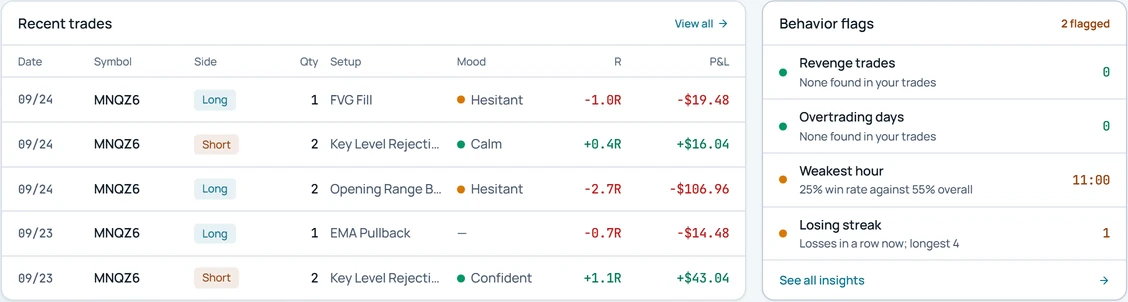
Recent trades with their setup, R and mood, beside the behavior flags Fillbook finds in them: revenge trades, overtrading days, your weakest hour and losing streaks.
Funded 50K · sample account
Sample data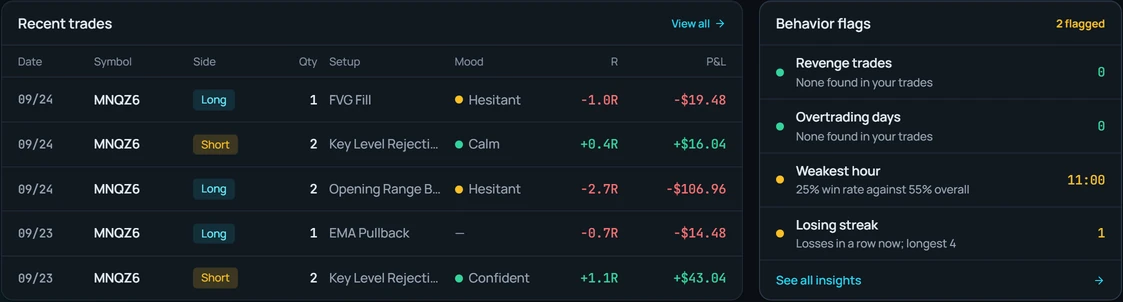
Risk first, performance second, reflection third
Three steps from your first trade file to a clear view of your room left.
1. Import or sync
Drop in a trade file and the platform is recognised automatically. Add auto-sync when you want trades to arrive on their own.
2. Enter your rules
Start from a firm preset or type your own drawdown, daily loss and consistency limits. Every value is editable.
3. See your room left
Open Fillbook before you trade and know whether the next one fits inside your rules, with a warning before you reach a limit.
What's inside
Facts from your own trades and your own rules. Fillbook warns; it never blocks or changes orders.
Risk room
Every rule's room left on each account, next to today's P&L, recalculated with every fill. Open-position P&L appears only when the NinjaTrader add-on reports it.
Several accounts at once
Switch between your accounts, see the open exposure and buffer of every account side by side, and keep a dated history of every rule change you made on each one.
Payout checklist
Consistency share, minimum trading days, news windows and overnight holds, each marked OK, Warning or Can't tell before you request. A checklist, not a verdict.
Risk Guardian
A pre-trade check: pick the contract, how many contracts and your stop in ticks, and see the trade's risk, the buffer left and the share of it the trade would use.
Daily Brief
Before the session: how the last session went, the buffer left to the floor, your strongest time window from your own trades, and what is worth watching today.
Session debrief
After today's session: how the Asia, London and New York sessions went compared with your own recent sessions, plus what went well and what to fix next time.
Edge Score
A 0 to 100 score built from five parts: profitability, consistency, risk control, stop adherence and rule adherence, plus a separate score for your account's health.
Journal, reports and plans
Daily journal entries with voice dictation, weekly and monthly reviews, reports by setup, symbol and time, and a written trading plan checked against your trades.
Start with a file. Add sync when you want it.
Synced accounts show when they last updated. Only connections proven on a real account are listed here.
File import
39+ brokers and platforms
Tradovate
Auto-sync
NinjaTrader
Auto-sync, plus live open P&L
Hyperprop
Auto-sync
Rithmic
Auto-sync
Quantower
Auto-sync
See all supported integrations
Every platform and broker we support
Pricing
Try Fillbook free for 14 days
After the trial, keep Free or choose a paid plan.
Same plans and prices for everyone. This only changes which features are listed.
Free
$0/mo
Your account's buffer, free for as long as you like.
- One account's drawdown, daily-loss and consistency buffer
- Unlimited trades, dashboard, calendar and equity curve
- Manual entry and CSV import (no auto-sync)
Core
Most popular$14.99/mo
or $149.90/yr — save 17%
Turn your trading history into a system for improvement.
Everything in Free, plus:
- Auto-sync for Tradovate, NinjaTrader, Hyperprop, Rithmic, and Quantower
- Risk-rule tracking and breach alerts for prop-firm accounts, up to 5 accounts
- Behavior flags, Daily Brief and Edge Score
Elite
$24.99/mo
or $249.90/yr — save 17%
An AI coach that reviews your trades and answers questions about your own data.
Everything in Core, plus:
- AI coach with narrative trade reviews
- Ask questions about your trading in plain English
- Behavior Replay and a weekly AI review email
Questions
Questions, answered
What is Fillbook?
Fillbook is a trading journal and analytics app built for futures traders. It imports or syncs your fills, then shows P&L, R-multiple, drawdown and behaviour patterns, and tracks prop-firm daily loss and drawdown rules.
What Fillbook does not do
Fillbook is a journal and analytics tool, not a broker, adviser or tax preparer. It has no market-data feed, and it cannot place, block or change orders.
- It tracks the rules you enter. Your firm's own platform is the official record.
- Figures are only as current as your last sync or import.
- It describes your past trades. It does not predict future results.
Know your room before the next trade.
Import a CSV or connect your platform, and see where every account stands before your next session.